

Slopes and tapered wedges
Calculating tapered wedges towards drains and gutters, the wedge schedule, the substrate board plan and production documents for ordering the tapered insulation.
Before you start
Slope design creates wedges of thermal insulation so that water flows to the outlets. The following must be finished in the roof editor:
- the scale and the roof outline,
- at least one outlet:
Drain,Gutter(gutter or free drainage edge) orScupper. Each separate part of the roof needs its own outlet.
Neither the build-up nor the materials are needed to calculate the wedges. If something is missing, the slope editor does not start the calculation and tells you what to add.
Slope design is for a flat roof with a level supporting structure. A hall with a sloped deck has no wedges; it is described in the guide Hall and diverters.
1. Open the slope design
- In the project cockpit, open the
Calculationstab. - In the
Slope design and cricketssection, clickOpen slope design. The editor opens for the active roof. - The editor has two steps:
1. Slopesand2. Crickets. The second step is unlocked after the first calculation.
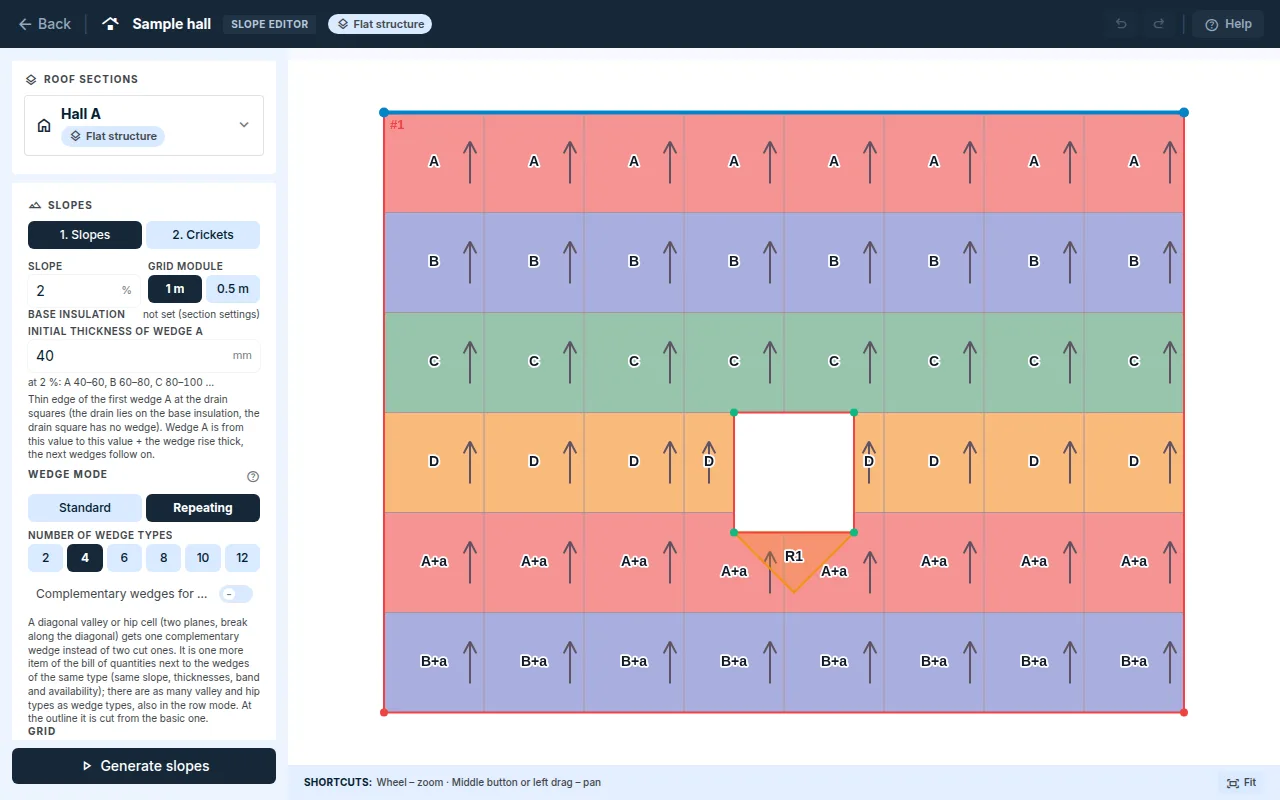
2. Parameters
Slope: the slope of the wedges in percent.Grid module: the wedge grid, 1 m or 0.5 m.Initial thickness of wedge A: the thin edge of the first wedge A at the drain, at least 20 mm. The drain square has no wedge and the drain lies on the base insulation. Wedges A, B, C … are laid from it, each one following on from the previous one. Below the field you can see the series of wedge thicknesses at the slope entered.Base insulationis shown above the field, read-only. You enter it in the roof editor in theStepswindow or in theMaterialstab.
The application calculates a slope of less than 3 %, but warns you about it.
3. Wedge mode
Standard: tapered wedges only, without substrate boards.Repeating: fewer wedge types (theNumber of wedge typesoption); flat substrate boards make up the missing height. The boards are in the schedule, and the total insulation volume stays the same.Complementary wedges for valleys and hips: a valley or hip cell gets one complementary wedge instead of two cut ones. It is listed in the schedule as an additional item.
4. Grid
- You set
Grid rotationas a number, with the−and+buttons in half-degree steps, or with theAutobutton. When the roof has a free drainage edge, the grid is aligned to it and manual rotation is not offered. Grid tools:Corner(click a roof corner and a grid intersection passes through it),Edge(the grid rotates parallel to the edge) andMove(by dragging on the canvas).- If the outline changes later, the editor tells you that the alignment is no longer valid. Align the grid again.
5. Generate slopes
- Click
Generate slopes. The calculation may take a while; the editor loads the result by itself. - The
Slope wedges/Tech. drawingswitch changes the view of the plan.Wedge labelsshows the wedge types. - The
Slope findingscard warns you, for example, about a strip without fall from which water cannot drain. TheShowbutton highlights the spot on the canvas. - The card also shows the status of the design:
Ready for constructionorDraft to be completed – not ready for constructionwith the findings of the piece check. A draft to be completed also carries a warning in the outputs.
If the geometry changes during the calculation, the calculation is not completed and the editor asks you to run it again. A result for the old outline would not be valid for the new one.
6. Crickets at obstacles
- Crickets at obstacles (skylight, chimney, shaft, superstructure …) are not drawn. They are created during the slope calculation as a layer of flat EPS boards on the wedges and lead water around the obstacle.
- The
2. Cricketsstep is an overview: crickets with the marks R1, R2 …, board counts and warnings. They are orange on the slope plan. - If the calculation has no crickets, the step says so. Water flow around the obstacles is then resolved in the tapered wedges.
7. Results and outputs
- The
Resultstab, after clickingShow detailed outputs, theThermal insulationcard: wedges by type,Ordering volume (whole boards)and substrate boards. - In the same tab, under
Production documents, you downloadCut list and order (CSV)andSubstrate board plan (PNG). The3D visual check of the slope designlink shows the roof in 3D. - The
Protocolstab: the chaptersWedge plan,Wedge scheduleandVolume list, and underDocuments for supplierstheThermal insulation and slope wedgescard. The Site drawing is created from a released revision of the supplier document.
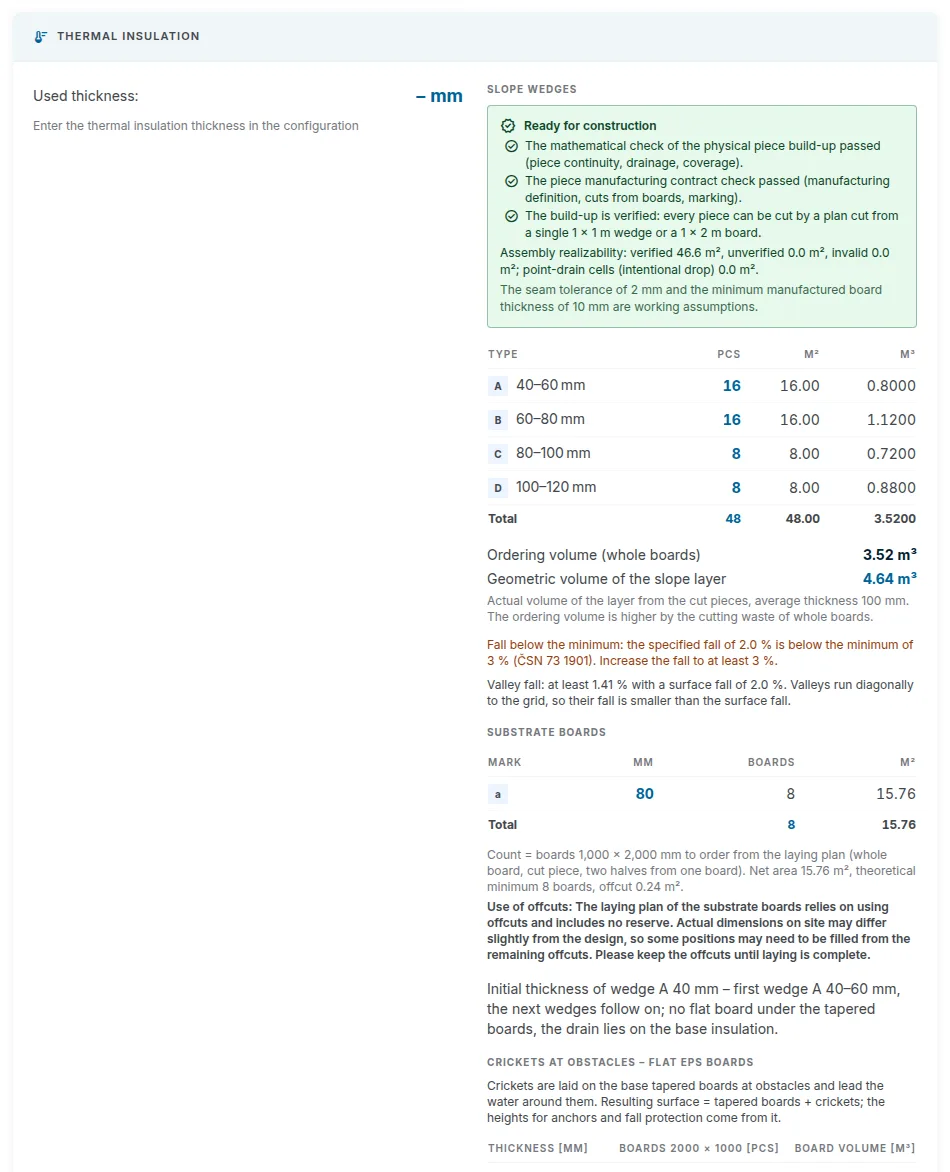
Narrow perimeter cuts at the parapet are usually filled in on site from leftovers. In the
Materialstab, sectionSlope wedges: ordering, there is the fieldDo not order cuts narrower than. The schedule then lists them on a separate row.
When to recalculate
- After a change to the outline, openings or outlets, the slope design result is no longer valid. Open the slope design and click
Generate slopesagain. - A new slope calculation invalidates the Anchor plan and the Green roof, because they are based on the wedge heights. Run them again afterwards.
Updated