

Drainage
Drains, gutters, scuppers and emergency overflows in the roof editor, the product manufacturer in Materials and the assessment of the main and emergency drainage.
1. Drainage elements in the editor
In the roof editor, they are in the Drawing section, in the Drainage group:
Drain: a point drain, one click inside the roof. A new drain aligns with the other drains;Altturns snapping off.Gutter: a gutter or free drainage edge. Click to set the start and the end; it snaps to the corners and edges of the roof.ScupperandOverflow(emergency overflow): they are placed on an edge of the outline, and water flows through them over the edge.
Each separate part of the roof needs its own outlet. A gutter applies only in the part where it is drawn. In a hall, drains lie only on the valleys, see Hall and diverters.
Scupper or emergency overflow
Below the tools there is a list of the placed scuppers and overflows with a Main outlet checkbox:
- ticked: the scupper is a main outlet, the slopes lead to it and it counts towards the drainage capacity,
- not ticked: an emergency overflow, assessed only in the emergency drainage.
Draw gutters parallel to the edge of the roof. The editor marks a skewed gutter and offers
Align with gridwith a preview of the shift.
2. Manufacturer and type of element
- In the project cockpit, open the
Materialstab, sectionHydraulics / drainage. - Choose
Drain manufacturerandDrainage product type. Only the types the manufacturer has in the catalogue are offered. You do not select a specific size; the drainage assessment calculates it. - For a walkable roof, tick
Walkable roof (terrace). The assessment then offers only walkable drain versions. - In the expandable
Emergency overflowsection, chooseOverflow manufacturer.
3. Drainage assessment
- Open the
Drainage assessmenttab. The active roof is assessed. - The assessment is not saved; it is calculated from the current data each time you open it. After changing the drains, the manufacturer or the slopes, click
Recalculate.
The main drainage shows Area A, Rainfall intensity r, Runoff coefficient C, Design flow Q, Drain capacity, the number of installed and required drains, Min. drains (ČSN) and Minimum sufficient size. The rainfall intensity and the runoff coefficient are fixed standard values.
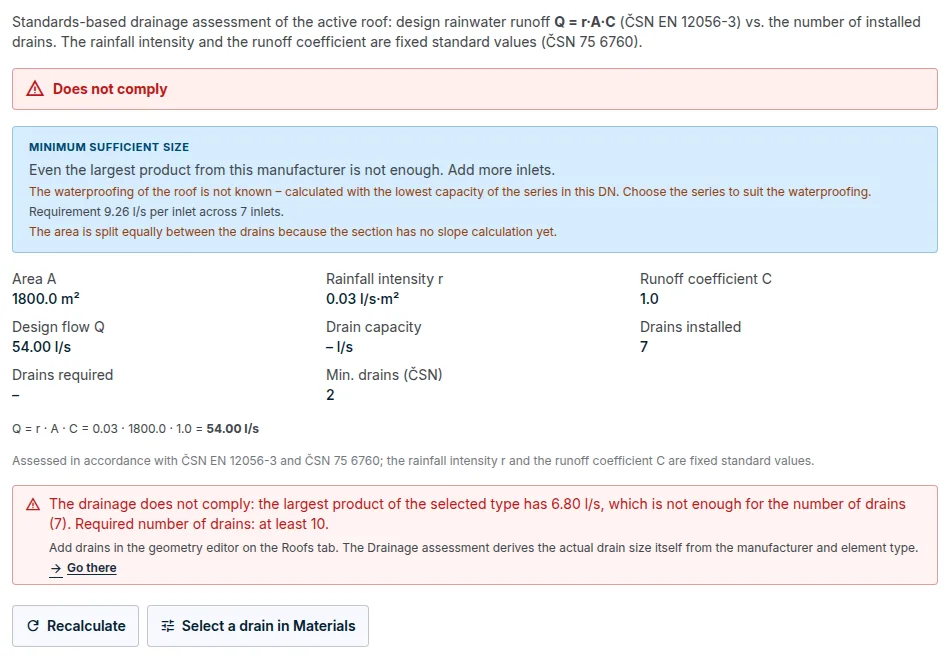
- Area per drain: with calculated slopes, each drain has its own drained area, and the size is determined by the drain with the largest area. Without valid slopes, the area is split equally between the drains, and the assessment says why.
- Series by waterproofing: in the same size, a manufacturer often has several series for different waterproofing types. The assessment selects the series according to the main waterproofing of the roof. If it does not know it, it calculates with the lowest capacity and warns you.
4. Emergency drainage
An emergency overflow drains only when the drains are blocked. That is why it has its own Emergency drainage assessment block with its own verdict.
- You enter the
Runoff coefficient C. Different values apply to emergency drainage than to the main drainage. - The application pre-fills it from the build-up only if it knows the thicknesses of all layers of the vegetation build-up. Otherwise it waits for your input.
- The block shows
Emergency flow Qnot,Overflow capacityandDesign head.
What the results mean
CompliesandDoes not comply: for a non-compliant result, the application states the number of drains to increase to. You add the drains in the roof editor.Cannot be assessed: an input is missing, for example the scale, the manufacturer of the elements or the coefficient for the emergency drainage. The application states what to add and where, and does not substitute anything.Not applicable: the roof has a free drainage edge and water drains freely. This is not an error.
The assessment covers the number and capacity of the drainage elements. It does not size pipework. The limits of the outputs are described in the article What FredIQ does not assess.
Updated