

Hall and diverters
A roof with a sloped supporting structure. Valleys, drains on the valleys, the deck slope, insulation in a single thickness and diverters along the valleys.
What a hall is
- With a sloped deck (hall), the supporting structure itself provides the slope, and the thermal insulation lies in a single thickness. No tapered wedges are generated.
- Water runs into the valleys. Point drains lie only on the valleys, and diverters along the valleys direct the water to them.
- You choose the type of supporting structure when you create the project:
Sloped deck (hall). It cannot be changed later. In the project cockpit, theStructure typelabel shows it with the valueHall / sloped.
Hall diverters are a different tool from the crickets at obstacles on a roof with tapered wedges. In a hall, they are created from the drawn valleys and drains.
1. Valleys and drains in the editor
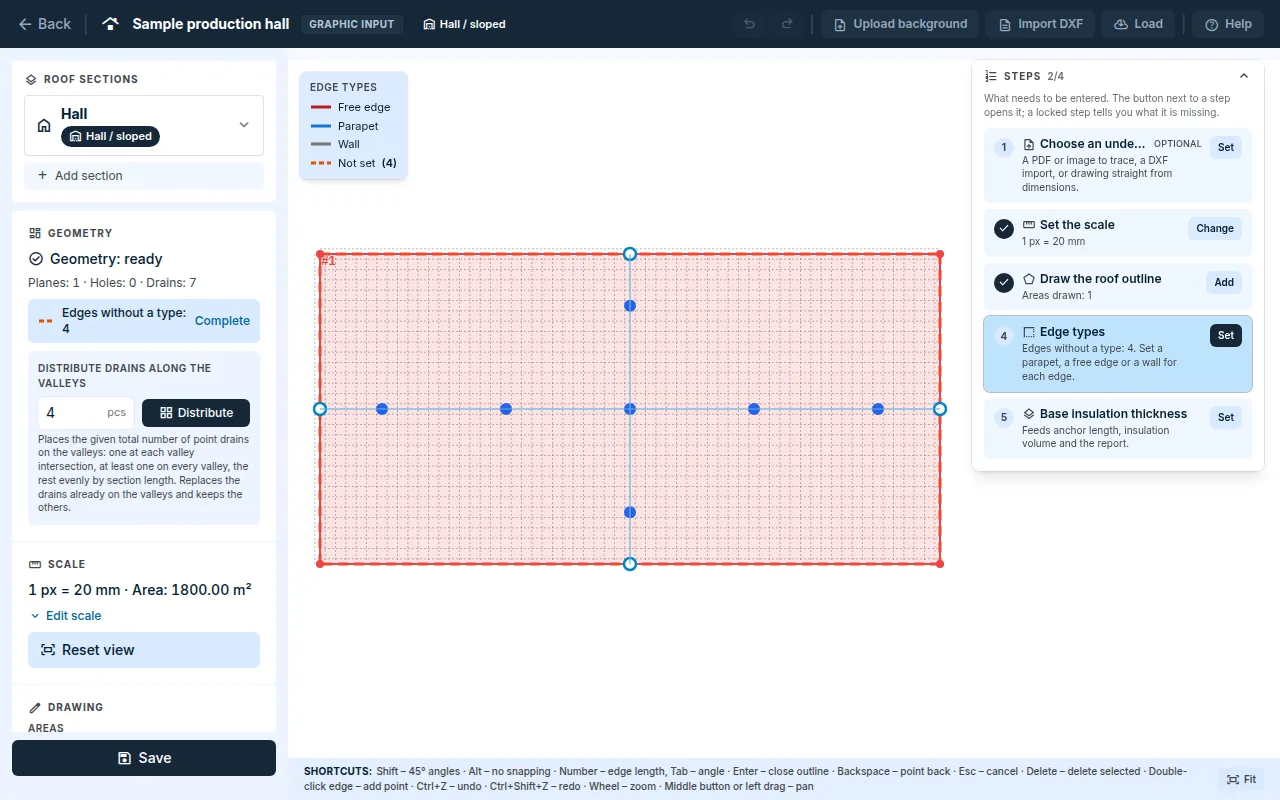
The hall editor has its own quick guide. You draw the outline in the same way as for a flat roof, see Drawing a roof.
- With the
Valleytool, draw a straight line with two clicks; the structure slopes down towards it. The ends snap to a corner or an edge of the outline;Altturns snapping off. - Place the drains with the
Draintool. A drain snaps to the nearest valley; it cannot be placed anywhere else. When you move a valley, the drains move with it. - Where two valleys cross or join, place a drain exactly on the intersection. Otherwise the diverters of the two valleys overlap.
- Click the area and, under
Selected area properties, fill inSupporting structure slope(1 to 10 %). The slope direction is not entered; it follows from the valleys. - Save the drawing with the
Savebutton.
A valley is not a gutter. A gutter (linear drainage) is not suitable for a hall: the drainage assessment would count it as a single drain.
Distribute drains along the valleys
- In the
Distribute drains along the valleysfield, enter the total number of drains for the whole roof and clickDistribute. - Each valley intersection gets one drain, each valley gets at least one, and the rest are divided according to the length of the sections.
- Drains that already lie on the valleys are replaced. Other outlets stay. A single
Ctrl+Zstep undoes the whole distribution.
If the number is too low, the application states the minimum number of drains needed. If not all of them fit, it places only as many as fit and says so.
2. Slope editor
- In the project cockpit, on the
Calculationstab, clickOpen slope design. For a hall, theSloped supporting structure (hall)panel opens. - The
Deck slope (planes)card shows the slope of each plane. A missing slope is markednot set. The application calculates a slope below 3 %, but warns you about it. - Enter the
Design rainfall intensityin l/s·ha. - Click
Generate. The application saves the geometry and calculates the roof area, the insulation volume and the design runoff. It takes the insulation thickness from the roof settings.
3. Diverters from valleys
- In the
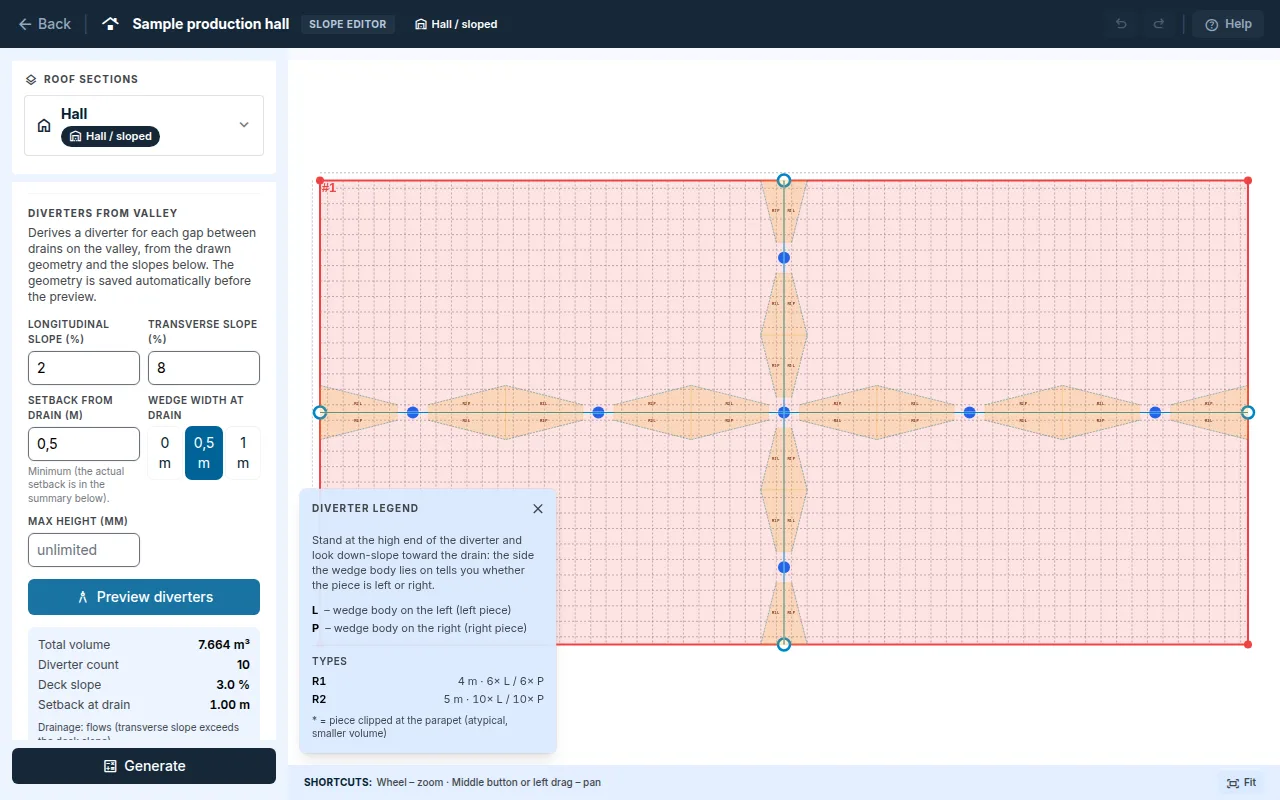
Diverters from valleycard, enterLongitudinal slope (%),Transverse slope (%),Setback from drain (m)andWedge width at drain.Max height (mm)is optional. - Click
Preview diverters. You will see the total volume, the number of diverters, the drainage assessment and thePiece list. The pieces are drawn in the plan. - The floating
Diverter legendwindow explains left and right pieces and lists the types with their counts. A piece with an asterisk is clipped at the parapet and has a smaller volume.
- The set is derived from the drawing and is not edited by hand. After changing valleys or drains, run
Preview divertersagain. The protocol is based on the parameters of the last preview. - Water drains from a diverter only if the transverse slope exceeds the deck slope. Otherwise the application states that the drainage does not flow out. Without a deck slope, it does not assess the drainage.
- If the diverters cannot be derived, the application gives the reason: a missing valley or scale, a valley that is not straight, a drain off the valley and so on.
The collapsed
Manual piece calculatorcalculates the volume of one wing from the dimensions you enter. It is a quick check outside the set and is not reflected in the protocol.
Outputs
- The
Protocolstab: theDiverterschapter. - The
Resultstab, after clickingShow detailed outputs: theThermal insulationcard with the insulation in a single thickness. - A hall has no tapered wedges, and therefore no site drawing and no 3D slope check either.
- The assessment of the number and capacity of drains is on the
Drainage assessmenttab, see Drainage.
Updated