

Project from Roof Calculator
Creating a flat roof project from a Roof Calculator file (.rcpx). What is taken over, how to go through the preview and what to do after the takeover.
What is taken over
Roof Calculator is a separate program for the structural assessment of the anchoring of the roof build-up. From the .rcpx file, FredIQ takes over:
-
the flat roof outline and the drains,
-
suction zones with the required anchor density and maximum spacing,
-
the strip cover width and the perimeter fixing.
-
The file is not stored. FredIQ does not use names, contacts, the logo or the site address.
-
Roof Calculator does not state edge types. After the takeover, all edges have no type.
-
Tapered wedges from the calculation are not taken over. FredIQ calculates the slopes.
-
A project from Roof Calculator is always a flat roof. The button is only offered if your account may create flat roof projects.
1. Create the project
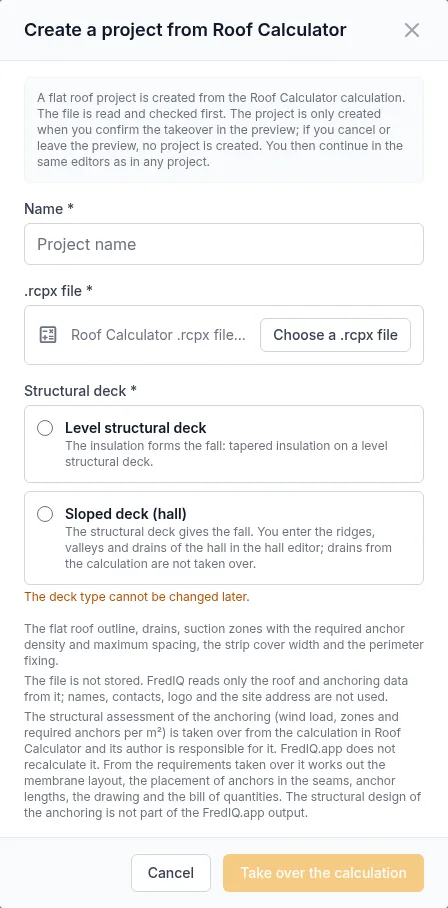
- In the projects overview, click
Create from Roof Calculatornext toNew project. - Fill in
Nameand select the.rcpx file. The file can be at most 10 MB. - Choose the
Structural deck:Level structural deckorSloped deck (hall). It cannot be changed later. - Click
Take over the calculation. The file is read and checked.
The project has not been created yet. It is only created when you confirm the takeover in the preview.
2. Preview
The preview shows the outline, size, area, drains and the Zones and required anchor densities table. Below it is the Calculation check with findings. A calculation with a finding that blocks the takeover cannot be taken over: fix it in Roof Calculator and upload the file again.
Then go through the options:
- Drains:
Take over the drains from Roof CalculatororI will enter the drains in the editor. A drain on the outline or in a corner is most likely just the default position that nobody moved in Roof Calculator. On the outline, the slope design cannot drain it. For a hall, drains are not taken over, because a hall drain always lies on a valley. - Waterproofing from the catalogue: choose the membrane that matches the membrane in the calculation. FredIQ does not choose it for you. If the membrane is not in the catalogue, choose
Membrane not in the catalogueand enterRoll width [mm]andAnchoring overlap [mm]from the manufacturer's technical data sheet. - Insulation and substrate from the calculation: the insulation thickness and the substrate are written to the roof only if you confirm it.
- Membrane layout: choose the
Seam directionand clickCheck. The check verifies that a seam of the layout falls into every zone. If it does not, it offersUse the suggestion.
3. Confirmation
- Click
Take over the calculation from Roof Calculator (.rcpx). You can confirm only with a membrane selected, after the check and without a blocking finding. - The project is created and the page shows
Next steps.
Cancel takeover or leaving the preview: no project is created.
Next steps
- Check the drains taken over in the geometry editor, or enter them.
- Set the type of each edge (parapet, free edge, wall), see Perimeter edge types.
- Calculate the slope design.
- Place the anchors with the values taken over. Anchors are placed only after the slope design, so that the clamping lengths of the anchors match the tapered wedges.
For a hall, enter the ridges, valleys and drains of the hall in the geometry editor and then generate the hall, see Hall and diverters.
What FredIQ does with the calculation taken over
- The structural assessment of the anchoring (wind load, zones and required numbers of anchors per m²) is taken over from Roof Calculator, and the person who prepared it is responsible for it. FredIQ does not recalculate it.
- From the requirements taken over, FredIQ works out the membrane layout, the placement of anchors in the seams, the clamping lengths of the anchors, the drawing and the bill of quantities. More in the guide Anchor plan.
- If you later change the roof outline or the waterproofing, the anchor plan warns that the structural assessment was made for different input data. You take over an up-to-date calculation by creating a new project from Roof Calculator.
- The limits of FredIQ outputs are described in the article What FredIQ does not assess.
Updated