

Perimeter edge types
Parapet, wall and free edge. Why to set the type of each edge manually, where to set it and what FredIQ calculates from it.
Why set the edge type
- Fall protection, the flashing quantities and the waterproofing upstand area need the type of the perimeter edge.
- The application never fills in the type by itself. An edge without a type stays without a type until you set it.
- Fall protection treats an edge without a type as unknown, never as safe.
- Slope design does not need the edge type.
Three edge types
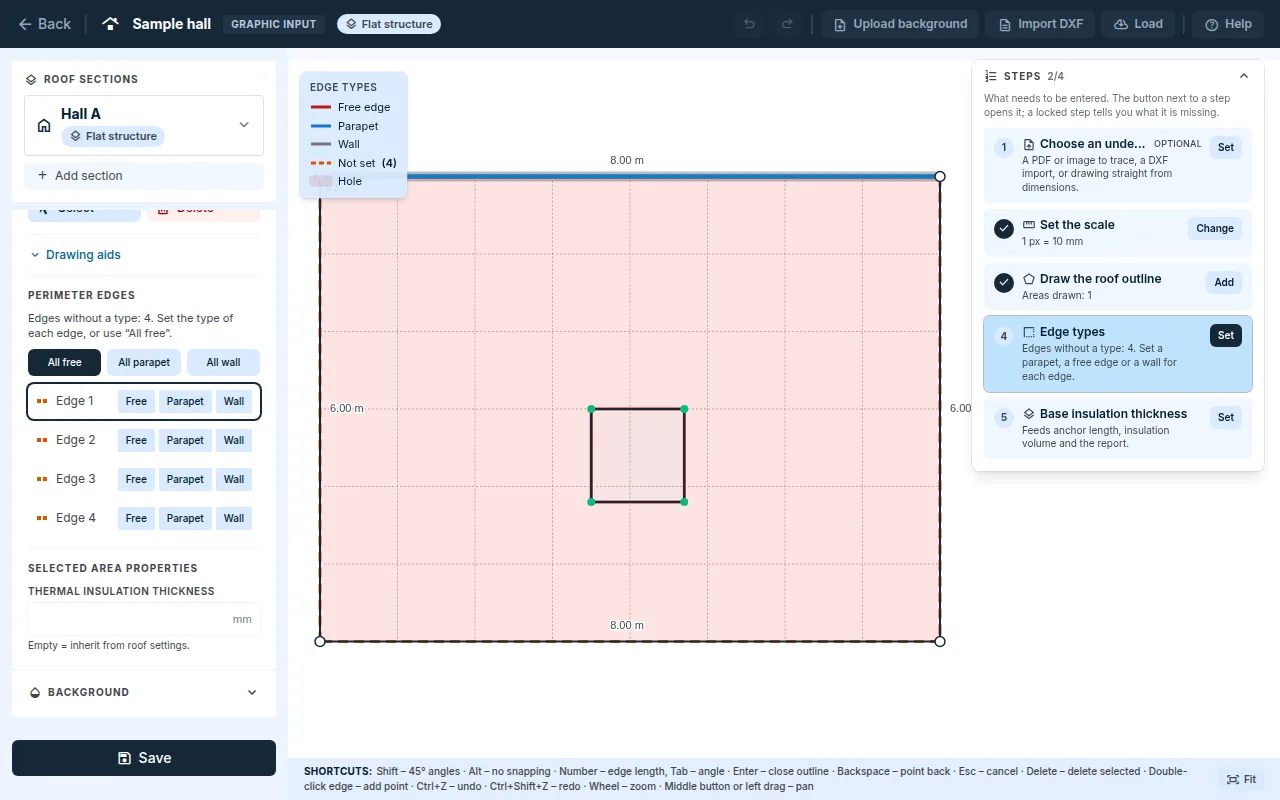
| Type | When | Colour on the canvas |
|---|---|---|
Free |
free drainage edge without a parapet | red |
Parapet |
the roof is bordered by a parapet | blue |
Wall |
the roof adjoins the wall of a higher part of the building | grey |
| no type | nobody has set the type yet | orange dashed |
The legend is in the top left corner of the canvas. You turn the colours off in Drawing aids with the Colour edges by type switch.
The
Freetype only describes the edge; it does not drain water. Draw drainage over the edge with theGuttertool.
Setting the edge type
- With the
Selecttool, click the roof area. - In the left panel, under
Perimeter edges, the edges are listed in order:Edge 1,Edge 2… For each one, chooseFree,ParapetorWall. - Clicking a row selects the edge and highlights it on the canvas. Its parameters appear below the list.
- Save with the
Savebutton at the bottom of the left panel.
Faster:
- The
Edges without a typebadge in theGeometrycard and theCompletebutton select the area with the first edge without a type and highlight the edge. All free,All parapetandAll wallset the type of all edges of the selected area, including those already set.Unset as freesets the free edge type only on edges without a type. Parapets and walls stay.
Edge parameters
Parapet:
Parapet heightandCrown widthin millimetres. The height is measured from the finished walkable surface at the least favourable point of the edge.Parapet load-bearing capacity confirmed by the designerandWaterproofing carried over the crown.Waterproofing fastening:Coated metal platesorTelescopic fasteners.Inner corner trimandOuter corner trim.- Without a height and a confirmed load-bearing capacity, fall protection does not assess the parapet as collective protection, see Fall protection.
Wall: Upstand height in millimetres. The length of the wall trim goes into the schedule.
Free edge: Eaves flashing.
For a parapet and a wall, you also enter Waterproofing waste for this edge in percent.
What FredIQ calculates from the edge types
- Fall protection: where there is a risk of falling from an edge and how to protect it. It assesses a parapet by the height entered and the confirmed load-bearing capacity.
- Flashing quantities: metres of parapet crown, wall trims and profiles.
- Waterproofing: the upstand area on parapets and walls, with the waste per edge.
Points and edge types
- Double-clicking an edge adds a point. Both parts of the edge inherit its type and parameters.
- The editor does not let you delete a point between two edges of different types. First give both edges the same type, then delete the point.
Edges of openings and superstructures
- A selected opening or superstructure has its own
Edgesin theSelected hole / superstructurepanel:FreeorWall. Opening typepre-fills the kind and the edges: a chimney is a superstructure with wall edges, a skylight is an opening with free edges. You reverse the pre-fill with theUndobutton, and you can still change both.- Fall protection takes over the opening type as a suggestion to be confirmed.
Pitched roof and facade
- Pitched roof: the application determines the edge types (eave, verge, ridge, hip, valley, slope break) from the roof shape. An edge that the shape did not decide is
Undetermined by geometry. More in the guide Roof shape and planes. - Facade: colour distinguishes only the base edge, where the panel layout starts, and the gable edges. You do not need to enter anything.
Updated