

New project and roof type
The roof type and structural deck of a new project. What each type covers, when to choose a hall and what cannot be changed after the project is created.
Create a project
- In the projects overview, click
New projectin the top right. TheNkey does the same. - Fill in
Name. - Choose the
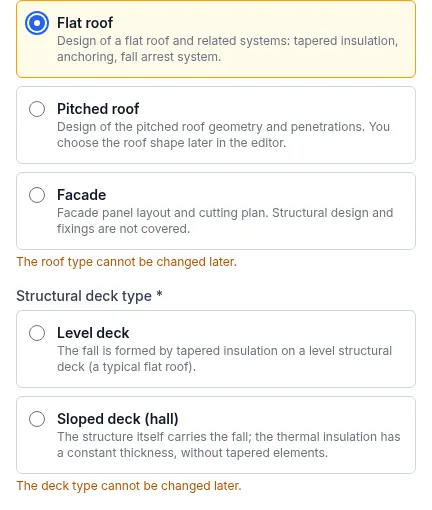
Roof type. - For a flat roof, choose the
Structural deck type. - You can fill in the city, address and client details now or later. Click
Save.
After saving, the cockpit of the new project opens.
Do you have a calculation from Roof Calculator? Create a project from it with the
Create from Roof Calculatorbutton next toNew project. More in the guide Project from Roof Calculator.
Which roof type to choose
Flat roof: slope design and tapered wedges, drainage, anchor plan, fall protection and green roof.Pitched roof: roof shape and penetrations, roof covering, battens and the covering and sheet-metal schedule. You choose the roof shape later in the editor.Facade: facade panel layout and cutting plan. Structural design and fixings are not covered.
One project has one roof type. Enter a building with both a flat and a pitched roof as two projects.
Level or sloped deck
For a flat roof, you specify what creates the fall:
Level deck: the fall is created by tapered wedges on a level structural deck. A typical flat roof. FredIQ calculates the wedges and substrate boards, see the guide Slopes and tapered wedges.Sloped deck (hall): the structural deck itself carries the fall, the thermal insulation has a constant thickness and there are no tapered wedges. Valleys, drains on the valleys and diverters are described in the guide Hall and diverters.
The application does not pre-fill the structural deck type. Choose it deliberately.
What cannot be changed after creation
- Roof type. Every further roof in the project has the same type.
- Structural deck type. It applies to all roofs of the project.
- You can change the name, address and client details at any time in the project cockpit on the
Settingstab.
When a project type cannot be selected
- The
New projectwindow offers only the project types your account may create. For an unavailable type it states the reason, for example that the account does not have it or that the monthly limit of new projects has been used up. - The company owner can remove a project type from a company member, see Your company and its people.
- This does not restrict projects in progress. You continue to edit them.
Updated