

Covering and sheet-metal schedule
How much covering, accessories, fixings, battens and sheet-metal elements a pitched roof needs. Waste, the sheet cut list and the CSV bill of materials for ordering.
Where to find the take-off
- Open the Covering module and choose a covering, see Roof covering.
- On the right is the
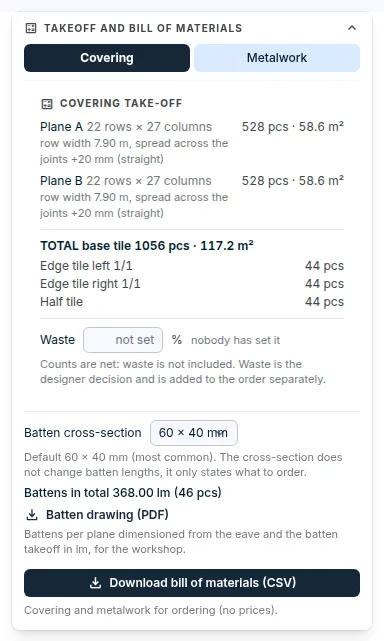
Takeoff and bill of materialswindow. Use the switch at the top to chooseCoveringorMetalwork. - The take-off is the basis for ordering. It contains no prices.
Covering
The covering take-off shows the pieces per plane and the total for the roof:
- For tiles and slates, the rows and columns and the number of whole and cut pieces. A cut piece is ordered whole.
- Row accessories as separate items, for example edge tiles and half tiles or starter panels.
- For sheet metal, strips and sheets by length, and linear metres.
- For tiles, the row width and a recommendation of how much to widen or narrow the covering between the verges to get whole tiles.
- Below the total, the fixings according to the covering manufacturer: nails, storm clips, hooks, screws or fixing clips. The counts do not include waste. What the manufacturer does not specify, the take-off does not output.
Waste
- The counts in the take-off are net, without waste.
- Leave the
Wastefield empty and the catalogue value applies, if the manufacturer has one. Or enter the waste for this roof as a percentage. - Waste that has not been set is not zero. The take-off says so and does not invent a count with waste.
- The count with waste appears below the net total as
WITH WASTE. Waste is not added to accessories and fixings.
Sheet metal: end lap, alignment and cut list
End lap along the slope: the overlap where sheets join. An empty field means the catalogue value.Strip alignment in this planeis offered on an open plane sheet:Auto,From left,CentredorFrom right, and for an edge alignment alsoOffset from the edgein mm. Left and right are as seen from the eave.- If an edge strip comes out narrower than a third of the cover width, the application warns you and offers an alignment that makes both edge strips equal.
- Identical sheet pieces have the same production mark across the whole roof. The
Sheet cut listtable shows the mark, count, order length, width and cuts. A sheet across an opening is ordered whole and cut around the opening on site. - Below the table you can download the
Cut list (CSV)andPiece drawings (workshop PDF)with a dimensioned drawing of every mark.
Battens
Below the covering take-off are the battens: battens per plane in linear metres and the Batten drawing (PDF). The options are described in the guide Battens.
Sheet-metal work
The Metalwork switch shows the edge lengths in metres and their number:
- ridge, eave, verge (left and right separately), hip, valley and, for a mansard, the slope break;
- opening flashing by side: eave side, ridge side, left side and right side.
The part of an opening's perimeter that cannot be classified (a sloped opening wall) is listed as unclassified. Determine the detail manually.
Download the bill of materials
- In the
Takeoff and bill of materialswindow, clickDownload bill of materials (CSV). - The file contains the covering, fixings, battens, sheet-metal work and opening flashing. It opens in Excel.
The bill of materials cannot be downloaded when the take-off does not match the latest change to the roof, or when the covering has changed in the catalogue and is waiting for confirmation. The application tells you what to do.
You will find the same files in the cockpit on the
Protocolstab, in theDocuments for supplierssection,Pitched roofcard:Bill of materials (CSV),Sheet cut list (CSV)andWorkshop PDF (sheet pieces, battens).
The covering take-off, assessment, battens and sheet-metal work are also in the project protocol.
When the take-off is recalculated
- After the roof is saved in the pitched roof editor, after the covering is changed and after the project options change: zone, fixing, windy site, waste, end lap, strip alignment and batten options.
- When the covering changes in the catalogue, the take-off waits for confirmation in the Covering module.
Updated