

Battens
Batten spacing from the covering manufacturer's data and the rafter length. Battens per plane in linear metres, batten options and the batten drawing as a PDF.
Where the battens come from
The Covering module calculates the battens together with the covering take-off, from the saved roof and the chosen covering. Nothing is drawn by hand.
- Tiles: the tile rows and the batten spacing are based on the rafter length and the manufacturer's tables: the maximum batten spacing by pitch, the distance of the first tile batten from the eave batten, and the ridge batten. The maximum spacing takes priority; the eave batten takes up the remainder within the manufacturer's range.
- Sheet metal and slates: the spacing and the offsets of the first batten from the eave and of the last one from the ridge follow the manufacturer's installation instructions.
- What the manufacturer does not state, the application does not make up. The take-off says what is missing.
For tiles, the assessment shows for each plane the number of rows, the batten spacing and the position of the first tile batten from the eave batten.
If the spacing for the edge tiles does not work out on the given rafter length, the application calculates with a smaller spacing and the assessment is
Suitable with a condition: lay without edge tiles, or adjust the overhang over the eave.
Where to find the battens
- Open the Covering module and choose a covering, see Roof covering.
- In the
Takeoff and bill of materialswindow on the right, chooseCovering. - Below the covering take-off is the battens section with the battens total in linear metres and in pieces.
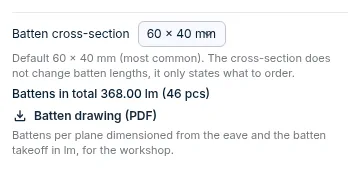
Batten options
Batten cross-section: 60 × 40 mm by default, or 50 × 30 mm. The cross-section does not change the batten lengths; it only states what to order.Eave finish:eave flashing / drip edgeorcovering into the gutter. Offered for a covering whose manufacturer sets the position of the second batten by the finish.Break finish: only for a roof with a slope break, such as a mansard.mansard tileorflashing. Without a choice, the battens of the planes at the break are not drawn.Eave batten offsetandfrom ridge: for sheet metal and slates. An empty field means the manufacturer's value from the catalogue. Without a value, no batten drawing is produced.
After you change an option, the take-off is recalculated automatically.
What the batten take-off contains
- Battens per plane in linear metres, net length without cutting allowance.
- The eave batten, the standard battens and the ridge batten. Openings are not deducted; the batten is cut around an opening on site.
- Where the manufacturer specifies decking instead of battens, the take-off states the decking area.
- The take-off does not include counter-battens.
- Missing battens do not block the covering take-off. You can order the covering without them.
Batten drawing
- The
Batten drawing (PDF)button below the total downloads the battens per plane, dimensioned from the eave, and the batten take-off in linear metres. - The button only appears when the take-off is up to date and the battens are complete.
- The battens are also in the CSV bill of materials and in the protocol on the
Protocolstab, see Covering and sheet-metal schedule.
Battens are no substitute for the design of the roof truss. The application does not assess the structural design of the roof truss, see What FredIQ does not assess.
Updated