

Cutting plan
Facade panel pieces to order by production mark, full panels and cut pieces with their cuts. Summary, format bill of materials, CSV download and the facade chapter in the protocol.
When you have a cutting plan
The cutting plan is created from the calculated panel layout. Without a chosen panel and a calculated layout there is none, see Facade panel layout.
The layout is calculated from the saved planes and options. After the surface changes, it is recalculated automatically, so the cutting plan matches the saved facade.
Summary and bill of materials in the editor
In the Panel layout step, below the options, you will find:
Summary:Panels (formats),Full panels,Cut pieces,Facade area without openingsandArea of ordered panels.Bill of materials: the panel formats and their count. One piece is one ordered panel.Warnings: pieces for which the minimum panel size cannot be kept.
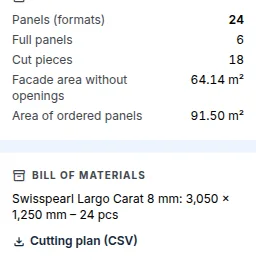
Download the cutting plan
- In the
Panel layoutstep, clickCutting plan (CSV)below the bill of materials. - Or in the cockpit on the
Protocolstab, in theDocuments for supplierssection,Facadecard,Cutting plan (CSV).
What the cutting plan contains
The cutting plan lists the pieces by production mark:
- the piece mark and the number of pieces;
- width and height in millimetres;
- whether it is a full panel or a cut piece;
- cuts: the edge, angle, direction and length of the cut (angled cuts for a gable);
- the planes in which the pieces lie, for example A1 and A2, with the count in each.
Identical pieces get the same production mark across the whole facade. The same mark is shown in the layout preview, in the 3D view and in the protocol, so you can find a piece on the drawing by its mark in the cutting plan.
The cutting plan contains no prices. FredIQ does not show prices anywhere.
Protocol
- In the cockpit, open the
Protocolstab. The last editor step,Report, also leads to the protocol. - The facade chapter contains the drawing of the views with pieces and marks, the unfolded facade, the bill of materials, the cutting plan and the warnings.
- The chapter always states that the layout does not cover structural design.
What the cutting plan does not cover
- Nesting several pieces into one panel. Each piece counts as one ordered panel.
- Non-rectangular openings.
- Sheet-metal elements, or reveals and lintel soffits made from panel strips.
- The structural design of the facade: fixing, spacing, substructure or wind load, see What FredIQ does not assess.
When a panel disappears from the catalogue
If the chosen panel or format is no longer in the catalogue, there is no layout and no cutting plan. The editor asks you to change the panel. Choose another panel and click Calculate layout.
Updated