

Fred, the assistant in FredIQ
Fred answers questions about the screen you are on and about the state of your project. Where to open him, what to ask and how to work with his answers.
Where to find Fred
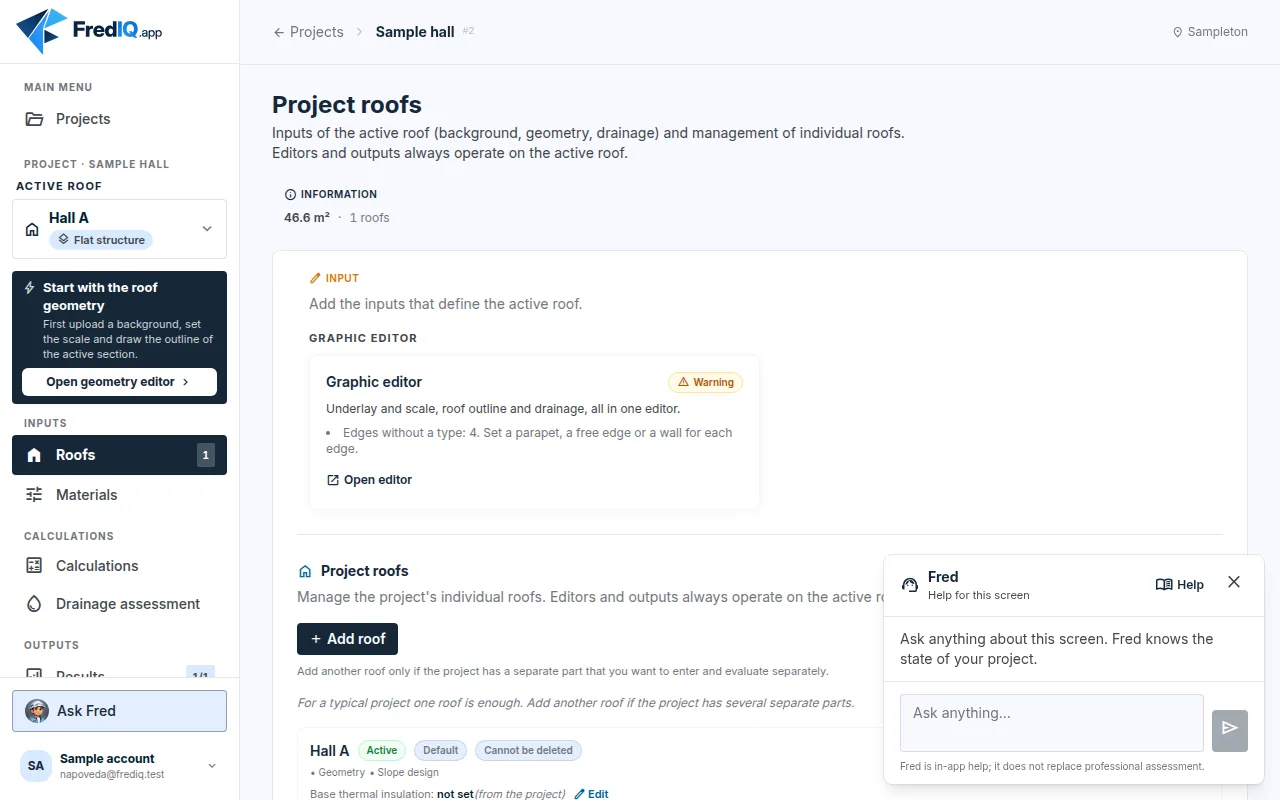
Fred is in the project. He never opens by himself; open him when you need him.
- Project cockpit: the
Ask Fredbutton at the bottom of the left panel. On a phone, Fred is an icon in the top bar. - Editors: the round button with Fred's picture at the bottom right, above the canvas.
Fred is not in the project overview or in the account settings, because questions to him always concern a specific project and roof.
How to ask
- Click
Ask Fred. - Type your question in the
Ask anything…field. A question can have at most 500 characters. Entersends the question,Shift+Enterstarts a new line.- Below the answer there is often a “Sources” line: the documents Fred put the answer together from.
- You can ask follow-up questions in the same window. Fred remembers what you have asked in it.
Closing the window ends the conversation. Opening it again starts a new conversation, so a question from the slope editor does not get mixed up with a question about anchoring.
What Fred knows
- The screen you are on and the state of the project: the active roof, what has been calculated, what is missing and what the module checks report.
- The FredIQ documentation that an expert guarantor has approved.
- He answers in the language your application is set to.
Fred does not receive the client's contact details or the site address. Fred does not change anything: he does not recalculate, save or release.
What to ask
- “What am I still missing for the protocol?”
- “Why can't I release the document for suppliers?”
- “What does this finding mean and how do I fix it?”
- “Why is the slope design out of date?”
- “What does clamping length mean?”
How to work with the answers
- Fred is help for the application; he does not replace a professional assessment.
- For statements about roofs, Fred should state what they are based on: a requirement of a standard with the number of the standard, manufacturer data, the FredIQ methodology, a recommendation or a general explanation. A recommendation is not an obligation.
- Take the numbers for the design and the order from the outputs of the application (protocol, documents for suppliers, material schedule), not from the conversation.
- Fred does not give prices.
- When Fred does not have the information, he should say so. Check an answer that does not seem right to you in the application or in the manufacturer's documentation.
What FredIQ does not assess at all is described in the article What FredIQ does not assess.
When Fred does not answer
- “Too many questions in a row. Please try again shortly.”: wait a moment and ask again.
- “Fred is currently unavailable.” or “Fred did not answer in time.”: ask again in a moment.
- You can use FredIQ normally even without Fred. Calculations and outputs do not depend on him.
Updated