

Manufacturer portal
What a manufacturer company finds in the manufacturer portal. Company overview, usage statistics for its own materials and the profile. Who has access to the portal and who designates a manufacturer company.
Who has access to the portal
- The portal is for companies that manufacture materials. A company is designated as a manufacturer company by the operator of FredIQ, you cannot switch it over yourself.
- Both the company owner and the people in the company can enter the portal: the
Manufacturer portallink in the top bar. - Only the company owner sees and changes the
Profile. - The owner adds people to the company in the company settings, the
Companylink in the top bar. The procedure is described in the Your company and its people guide.
A manufacturer company is also an ordinary company: its people create and draw projects like anyone else. The portal does not show projects of other companies.
Overview
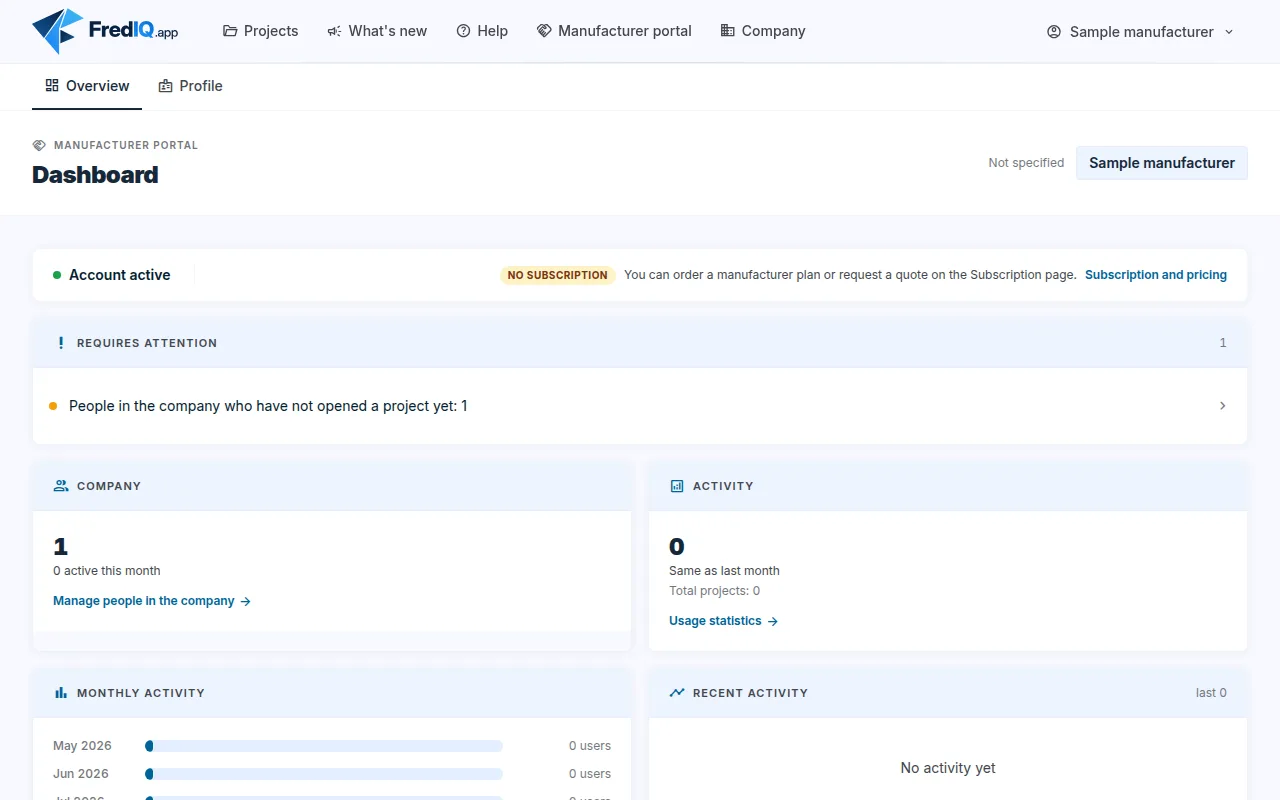
The portal menu has Overview, Statistics (if your company has them, see below) and, for the owner, Profile. On the overview you will find:
- Account and subscription status with the
Subscription and pricinglink. Requires attention: here the owner sees, for example, people in the company who have not opened any project yet, or suspended company members.Company: how many people are in the company and how many of them were active this month. The owner has theManage people in the companylink here.Activity,Monthly activityandRecent activity: what the people of your company have done in FredIQ. TheUsage statisticslink leads to the detailed usage of the company.What I sponsor: only if you pay for a FredIQ licence for another company. You see the status of its licence, not its projects.
Statistics
Statistics show how designers in FredIQ use the materials of your manufacturers in the catalogue. Only your own portfolio, without competitor data and without prices. They are described in detail in the Manufacturer statistics guide.
Profile
The profile is managed by the company owner:
- the account identity (name, e-mail, roles) and the market position,
Areas: in which areas (flat roofs, pitched roofs, facades) the company creates projects and with what monthly limit,Billing: the plan, orders and invoices are on the Subscription page,Default page after login:My projectsorManufacturer portal.
Subscription
- You order a manufacturer plan or request a quote on the Subscription page. You will find the prices there.
- The people of your company are included in the price of the manufacturer plan.
- The manufacturer plan does not change the calculations, the order of products in the catalogue or which projects you see.
You do not create products in the FredIQ catalogue in the portal. How they get into the catalogue is described in the Manufacturer catalogue in FredIQ guide.
Updated